How to Create the Best Church Flyer
Establish a Visual Hierarchy
People usually scan flyers in an “F” or “Z” pattern. You want the most important information to catch their eye first.
-
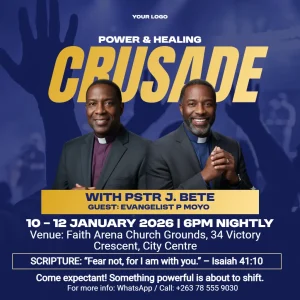
The “Hook”: This is your headline. It should be the largest text on the page (e.g., “Worship Under the Stars” or “3 Day Crusade”).
-
The Details: Secondary information like the date, time, and host and speaker should be slightly smaller.
-
The Fine Print: Things like “Free childcare provided” or “Parking in the rear” should be the smallest, but still legible.
The “Must-Have” Information
Church info vary from church to church, but this information is found on most flyers
-
Who: Your church name and logo.
-
What: The name of the event.
-
When: Date and time (include the day of the week!).
-
Where: Physical address or Join Online” link.
-
Why: A one-sentence value proposition (e.g., “Find community and hope”).
Use the Right Colours
Use colors that match your church branding or the season. 1- 2 colours are enough. Avoid too many colours and clashing colour palettes.
Fonts
Use bold fonts that captures the eye fast. Keep fonts minimum. One or two fonts are usually enough: one for the headline and the other for secondary text. You can use fonts such as Anton, Fjalla One, League Spartan for the headlines. For special styling and writing you can use fonts such as Roustel, Ephesis, and Alex Brush.
Use High-Quality Imagery
-
Real People: If possible, use high-quality photos of your actual congregation. It feels more authentic and “human” than stock photography. Quality photos also come out nice without fuzzy edges if you plan to create cutouts by removing background
-
Stock Photos: If you use stock, look for “candid” shots. Avoid overly staged or “cheesy” religious imagery.
-
Resolution: Ensure your images are at least 300 DPI if you plan to print them.
Include a Clear Call to Action (CTA)
What do you want them to do next?
-
QR Codes: Link them to a registration form, or a Google Maps pin.
-
Social Handles: “Follow us @ChurchName for updates.”
-
Contact: A simple email or phone number for questions.


 Premium
 Premium


 Premium